> ## Documentation Index
> Fetch the complete documentation index at: https://docs.idemeum.com/llms.txt
> Use this file to discover all available pages before exploring further.
# Run dashboard
> Overview of AI agent runs.
# What is a run?
A run is one end-to-end execution of the agent: a request comes in, a skill is matched (or the run becomes a triage run), a plan is built and checked against the guardrails, steps execute with gates, the outcome is verified, and the run is recorded as a ticket. One request equals one run. A follow-up message starts a new run; runs don't share memory.
Runs start from four places: a typed request in the desktop app, a quick action, a Slack or Teams message, or a proactive trigger that detected an issue.
Every run contains:
* **Goal -** the request, in the user's words.
* **Skill -** the playbook that handled it, or triage if none matched.
* **Plan -** the ordered steps generated before execution.
* **Steps -** each with its tool, parameters, result, and outcome.
* **Gate decisions -** every preview shown, every consent given or declined.
* **User feedback -** what the user said when asked whether it's fixed.
* **Summary and ticket -** the plain-language result, recorded with the full trail.
# Run dashboard
If you access the admin portal of your idemeum tenant, you can view the runs dashboard by navigating to the `Runs` menu.
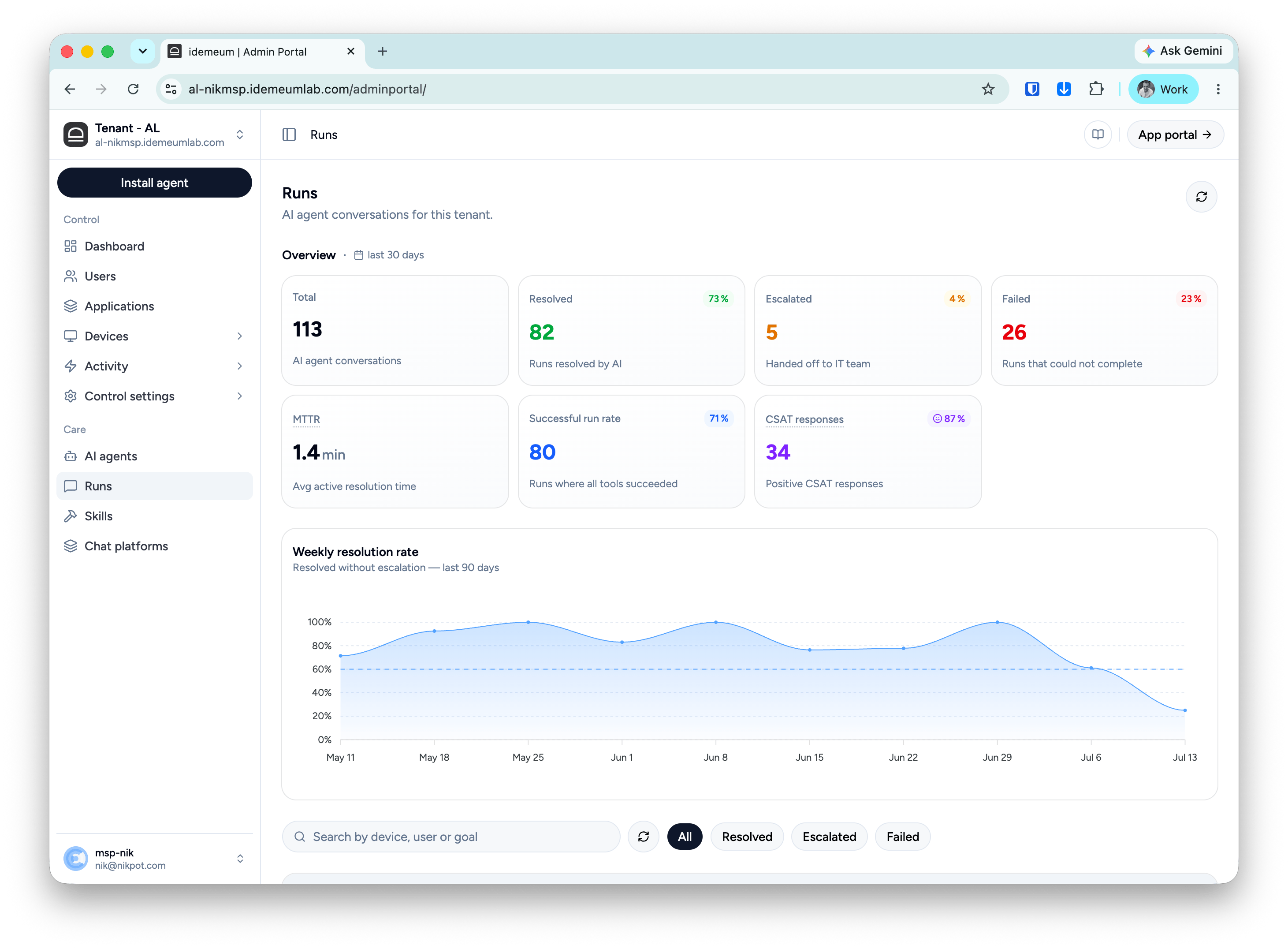 The Runs overview summarizes the last 30 days of agent activity for the tenant.
* **Total** - all AI agent conversations in the period. One conversation is one run: a request, a plan, gated execution, and an outcome. This is your adoption and load number.
* **Resolved** - runs the AI fixed end to end, with the percentage of total. This is the headline value metric: every point here is a ticket your IT team never touched.
* **Escalated** - runs handed off to the IT team with the diagnostic trail attached.
* **Failed** - runs that could not complete: an error, an abandoned session, or a run stopped mid-way. Unlike escalations, these ended without a clean outcome.
* **MTTR** - average active resolution time: how long the agent worked per run, excluding time spent waiting for the user at approval gates. Because waiting is excluded, this measures the agent's actual speed and is comparable to your human MTTR baseline.
* **Successful run rate** - runs where every tool step succeeded. This measures execution quality, and it's deliberately different from Resolved: tools can all succeed while the user still reports the problem persists (the run escalates), and a run can resolve even when a step was declined. A gap between this number and Resolved is your signal that fixes are running but not always helping.
* **CSAT** - the number of responses where users left positive feedback, and the percentage shows the total positive percentage of all user responses.
* **Weekly resolution rate** - the trend line shows the share of runs resolved without escalation, week by week over the last 90 days. Watch it after changes: enabling a new skill, editing a custom skill, or onboarding a new group of devices should show up here within a week or two.
# How run verdict is decided
Every run ends as **Resolved**, **Escalated**, or **Failed**. The verdict combines what the tools did with what the user said, and the user's word outranks the automation's. Three rules, applied in order:
1. **If the steps didn't execute correctly, the run is Failed.**
The Runs overview summarizes the last 30 days of agent activity for the tenant.
* **Total** - all AI agent conversations in the period. One conversation is one run: a request, a plan, gated execution, and an outcome. This is your adoption and load number.
* **Resolved** - runs the AI fixed end to end, with the percentage of total. This is the headline value metric: every point here is a ticket your IT team never touched.
* **Escalated** - runs handed off to the IT team with the diagnostic trail attached.
* **Failed** - runs that could not complete: an error, an abandoned session, or a run stopped mid-way. Unlike escalations, these ended without a clean outcome.
* **MTTR** - average active resolution time: how long the agent worked per run, excluding time spent waiting for the user at approval gates. Because waiting is excluded, this measures the agent's actual speed and is comparable to your human MTTR baseline.
* **Successful run rate** - runs where every tool step succeeded. This measures execution quality, and it's deliberately different from Resolved: tools can all succeed while the user still reports the problem persists (the run escalates), and a run can resolve even when a step was declined. A gap between this number and Resolved is your signal that fixes are running but not always helping.
* **CSAT** - the number of responses where users left positive feedback, and the percentage shows the total positive percentage of all user responses.
* **Weekly resolution rate** - the trend line shows the share of runs resolved without escalation, week by week over the last 90 days. Watch it after changes: enabling a new skill, editing a custom skill, or onboarding a new group of devices should show up here within a week or two.
# How run verdict is decided
Every run ends as **Resolved**, **Escalated**, or **Failed**. The verdict combines what the tools did with what the user said, and the user's word outranks the automation's. Three rules, applied in order:
1. **If the steps didn't execute correctly, the run is Failed.**
Tool outcome unresolved, failed, or cancelled means the agent couldn't do its job, regardless of any feedback. This is an agent problem to investigate, not a user problem.
2. **If the steps ran but the user says the problem persists, the run is Escalated.**
Feedback of "partial" or "unresolved" overrides tool success. The automation worked, the fix didn't help, and a human should look; the skill may not cover the full issue.
3. **Otherwise, the run is Resolved.**
The user confirmed the fix, or gave no feedback after successful execution. No-feedback runs are closed optimistically; watch whether they reopen.
```mermaid theme={null}
%%{init: {
"theme": "base",
"themeVariables": {
"fontFamily": "Inter, ui-sans-serif, system-ui, sans-serif",
"fontSize": "14px",
"primaryColor": "#ffffff",
"primaryBorderColor": "#e4e4e7",
"primaryTextColor": "#18181b",
"lineColor": "#a1a1aa",
"edgeLabelBackground": "#ffffff"
},
"flowchart": { "useMaxWidth": false, "nodeSpacing": 40, "rankSpacing": 42 }
}}%%
flowchart TD
Q1{"Did the steps
execute correctly?"} -- no --> F("Failed")
Q1 -- yes --> Q2{"Did the user say
the problem persists?"}
Q2 -- yes --> E("Escalated")
Q2 -- "no, or no response" --> R("Resolved")
classDef card fill:#ffffff,stroke:#e4e4e7,stroke-width:1px,color:#18181b;
classDef primary fill:#18181b,stroke:#18181b,color:#fafafa;
classDef destructive fill:#fef2f2,stroke:#fecaca,stroke-width:1px,color:#b91c1c;
classDef muted fill:#f4f4f5,stroke:#e4e4e7,stroke-width:1px,color:#3f3f46;
class Q1,Q2 card;
class R primary;
class E muted;
class F destructive;
```