> ## Documentation Index
> Fetch the complete documentation index at: https://docs.idemeum.com/llms.txt
> Use this file to discover all available pages before exploring further.
# Run details
> Review the metadata details for each run.
# Review run details
Navigate to the idemeum admin portal, click `Runs` menu, and now you can click any run to open its full record. Run details page is the audit view of a single run: what was asked, what the agent planned and did, what the user approved, and what it cost.
## Header
The header shows the run's goal in the user's own words, who ran it, on which device, and when.
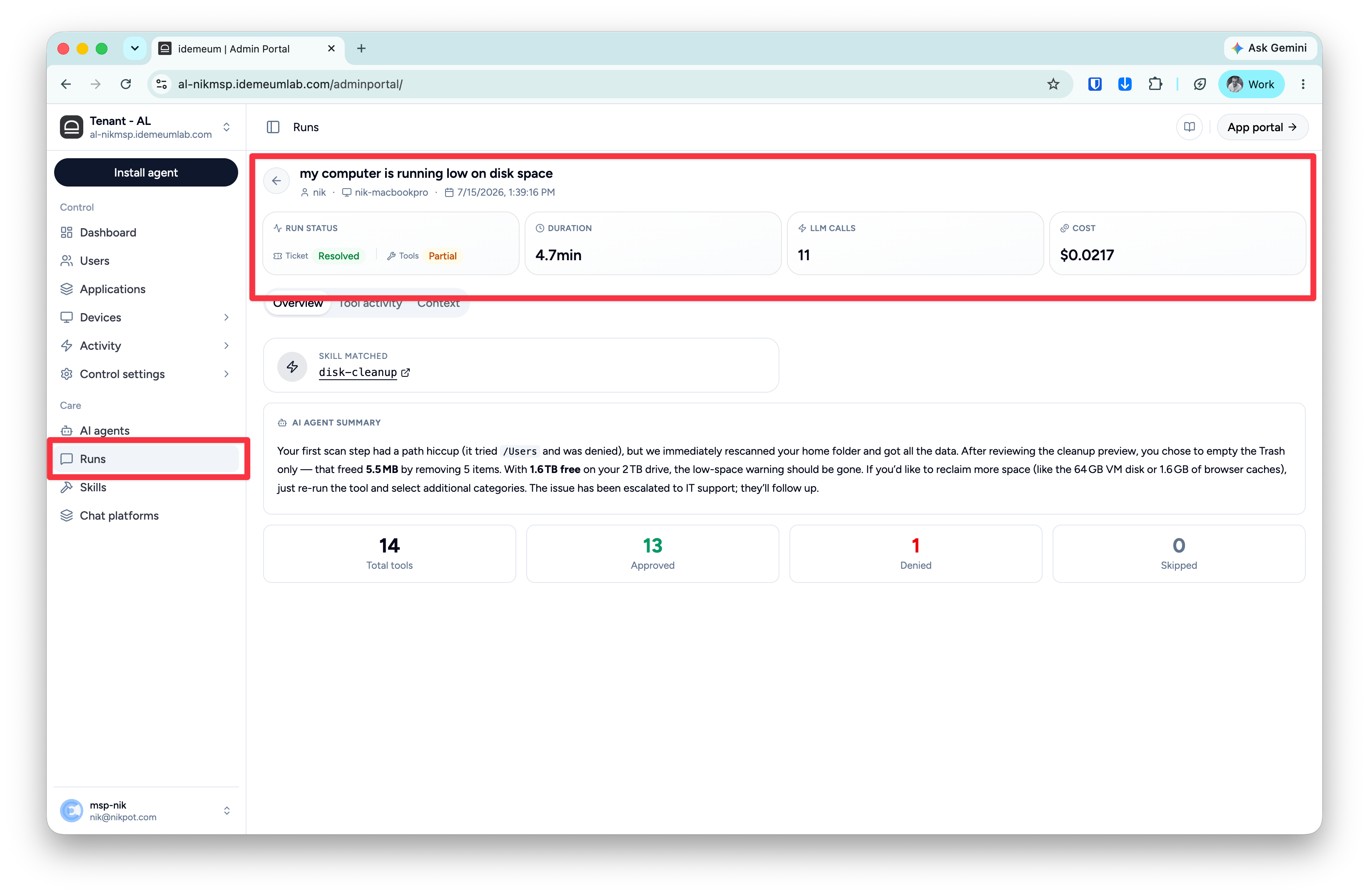 Four cards summarize the run:
| **Card** | **Meaning** |
| :------------- | :-------------------------------------------------------------------------------------------------------------------------------------------------------------------------------------------------------------------------------------------- |
| **Run status** | Three signals side by side: **Ticket** (the run's verdict: Resolved, Escalated, or Failed), **Tools** (how execution went: resolved, partial, unresolved, or cancelled). **User** (if the user believes the run resolves the problem or not). |
| **Duration** | End-to-end run time. |
| **LLM calls** | Number of model calls the run made. |
| **Cost** | LLM cost of the run, computed from actual token usage. |
## Overview tab
The at-a-glance story of the run.
Four cards summarize the run:
| **Card** | **Meaning** |
| :------------- | :-------------------------------------------------------------------------------------------------------------------------------------------------------------------------------------------------------------------------------------------- |
| **Run status** | Three signals side by side: **Ticket** (the run's verdict: Resolved, Escalated, or Failed), **Tools** (how execution went: resolved, partial, unresolved, or cancelled). **User** (if the user believes the run resolves the problem or not). |
| **Duration** | End-to-end run time. |
| **LLM calls** | Number of model calls the run made. |
| **Cost** | LLM cost of the run, computed from actual token usage. |
## Overview tab
The at-a-glance story of the run.
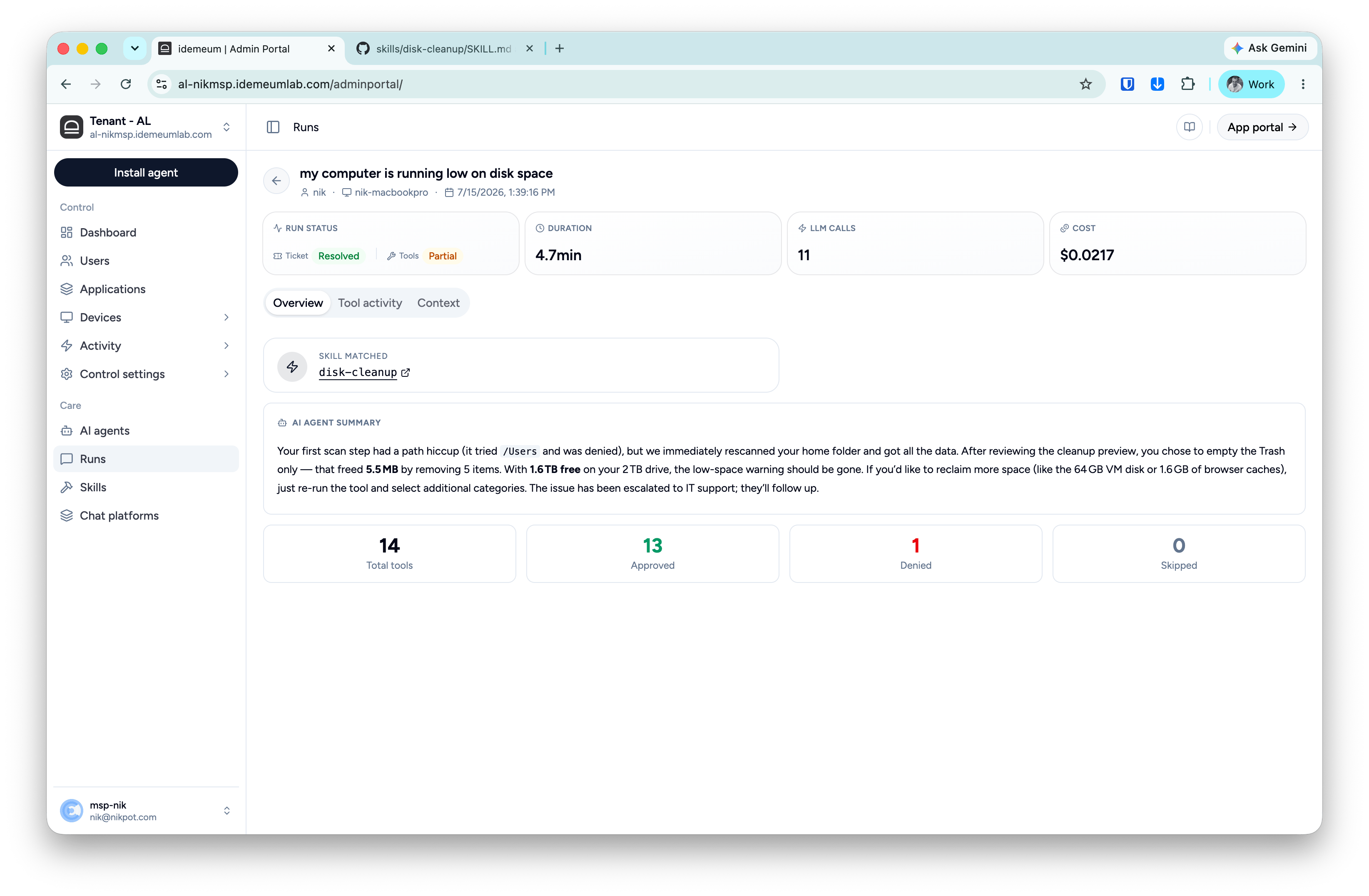 * **Skill matched** - which playbook handled the request, linked to its skill page. Triage runs show Triage instead.
* **AI agent summary** - the plain-language account of what happened: what was found, what the user chose, what changed, and what was handed off. This is the same summary the employee saw, so support and the user are always looking at the same story.
* **Tool counts** - total tool steps, and how they ended: **Approved** (ran), **Denied** (stopped, by the user or by a guardrail), **Skipped** (not needed for this run).
## Tool activity tab
The step-by-step execution record, in order. Read this tab when you need to verify exactly what touched the device, or to understand why a run's Tools signal is `partial`: the denied and failed steps are highlighted with their reasons.
* **Skill matched** - which playbook handled the request, linked to its skill page. Triage runs show Triage instead.
* **AI agent summary** - the plain-language account of what happened: what was found, what the user chose, what changed, and what was handed off. This is the same summary the employee saw, so support and the user are always looking at the same story.
* **Tool counts** - total tool steps, and how they ended: **Approved** (ran), **Denied** (stopped, by the user or by a guardrail), **Skipped** (not needed for this run).
## Tool activity tab
The step-by-step execution record, in order. Read this tab when you need to verify exactly what touched the device, or to understand why a run's Tools signal is `partial`: the denied and failed steps are highlighted with their reasons.
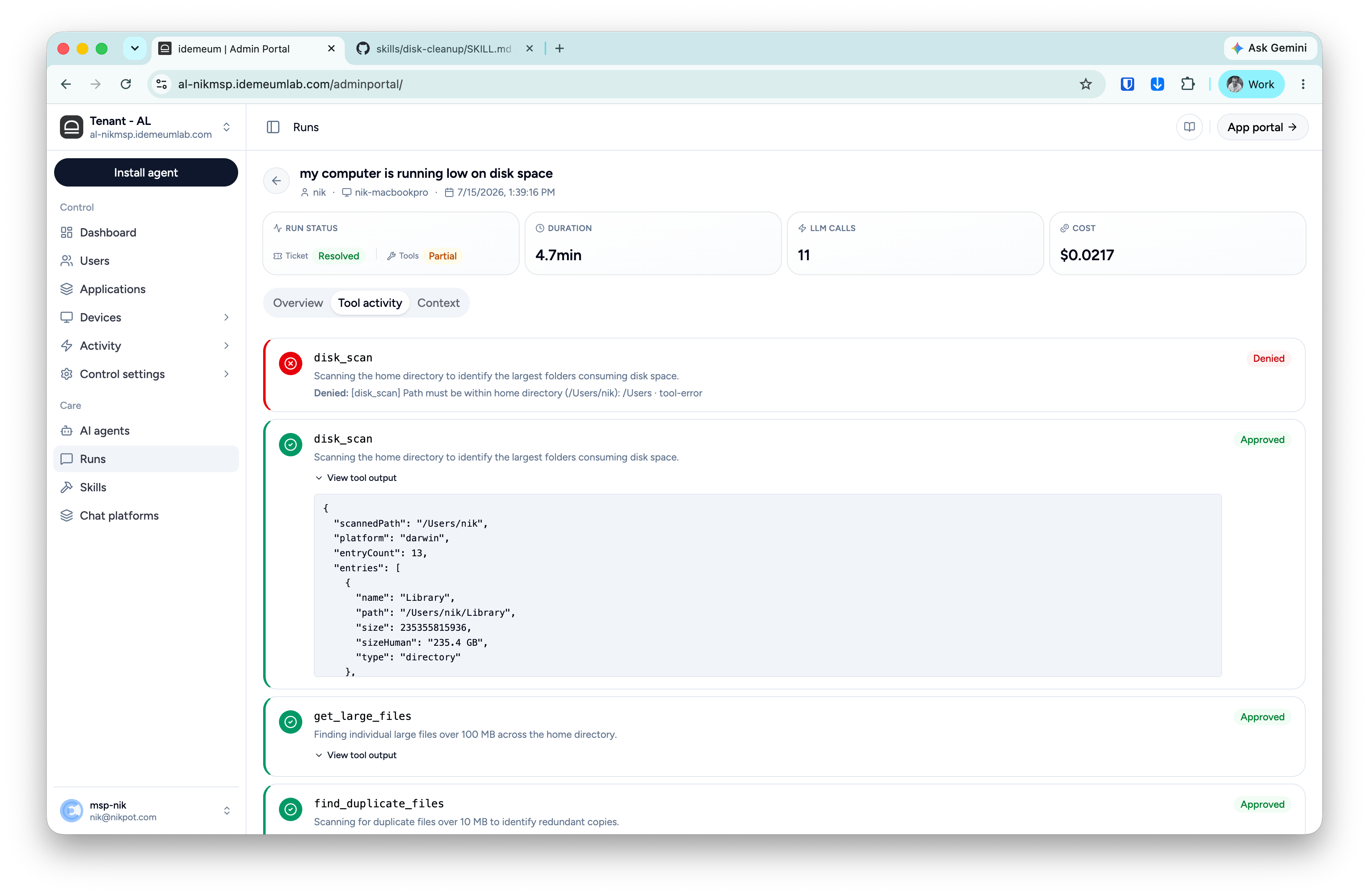 Each entry shows:
* **Tool name and status** - Approved or Denied, color-coded.
* **What it was doing** - the step's rationale in plain language ("Scanning your home directory to identify which top-level folders are using the most space").
* **Why, if denied** - the exact denial reason. A step can be denied by the user at a consent gate or blocked by a guardrail; the reason line always says which and why. In the example above, `disk_scan` was blocked by the scope guardrail because the requested path was outside the user's home directory - the run continued safely with other diagnostics.
* **View tool output** - the raw result the tool returned (paths, sizes, counts), expandable per step. This is the evidence behind the summary's claims.
## Context tab
Everything about where and how the run executed:
Each entry shows:
* **Tool name and status** - Approved or Denied, color-coded.
* **What it was doing** - the step's rationale in plain language ("Scanning your home directory to identify which top-level folders are using the most space").
* **Why, if denied** - the exact denial reason. A step can be denied by the user at a consent gate or blocked by a guardrail; the reason line always says which and why. In the example above, `disk_scan` was blocked by the scope guardrail because the requested path was outside the user's home directory - the run continued safely with other diagnostics.
* **View tool output** - the raw result the tool returned (paths, sizes, counts), expandable per step. This is the evidence behind the summary's claims.
## Context tab
Everything about where and how the run executed:
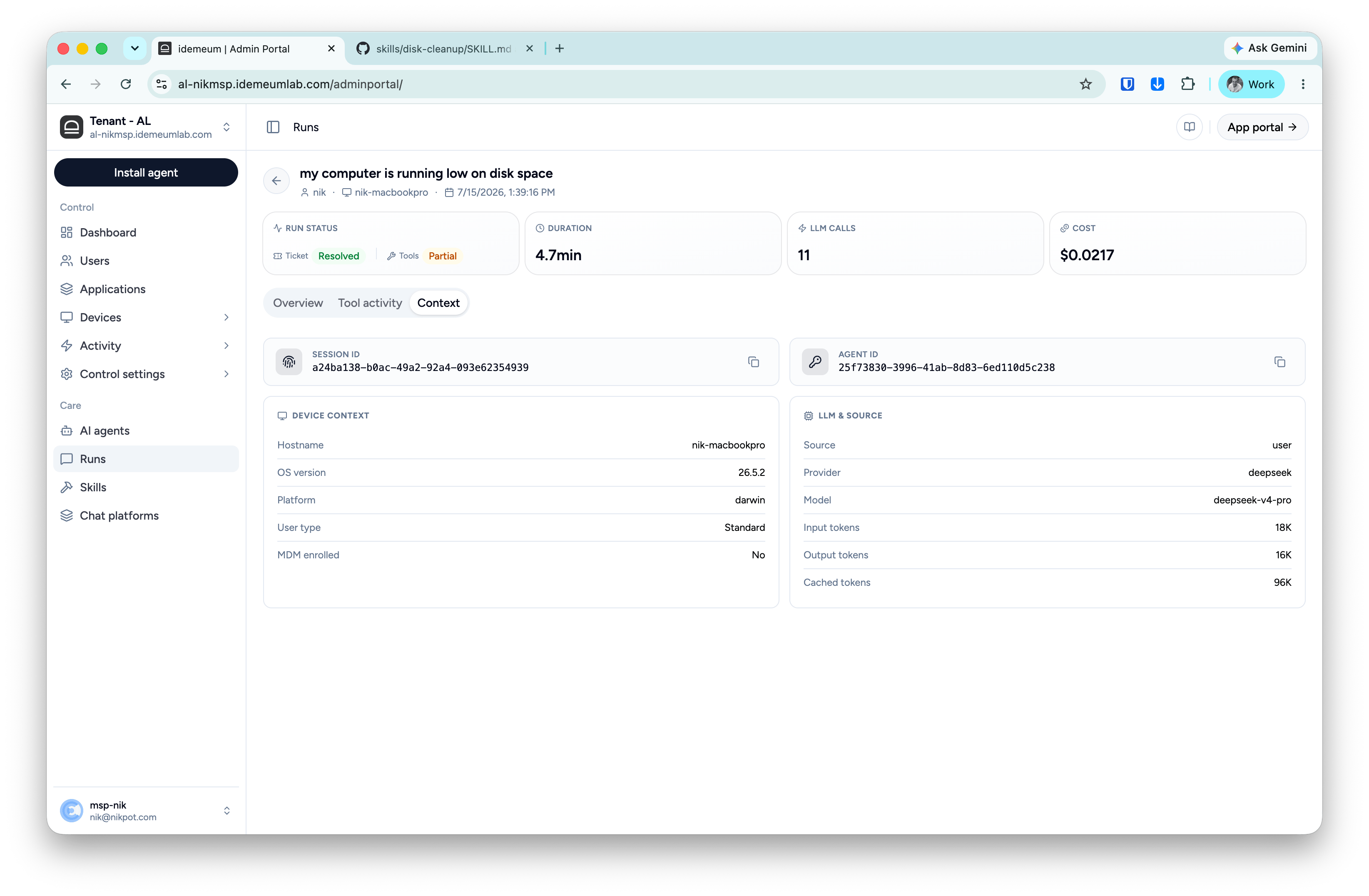 | **Section** | **Fields** |
| :----------------- | :---------------------------------------------------------------------------------------------------------------------------------------------------------------------------------------------------------------------------------------------------- |
| **Identifiers** | Session ID and Agent ID, copyable — use these when correlating with logs or support requests. |
| **Device context** | Hostname, OS version, platform, user type (standard or admin), MDM enrollment. Captured at run time, so it reflects the machine as it was during the run. |
| **LLM & source** | How the run started (user, quick action, chat, or proactive), which provider and model served it, and token usage: input, output, and cached tokens. Cached tokens are billed at a fraction of input price, which is why cost stays low on long runs. |
| **Section** | **Fields** |
| :----------------- | :---------------------------------------------------------------------------------------------------------------------------------------------------------------------------------------------------------------------------------------------------- |
| **Identifiers** | Session ID and Agent ID, copyable — use these when correlating with logs or support requests. |
| **Device context** | Hostname, OS version, platform, user type (standard or admin), MDM enrollment. Captured at run time, so it reflects the machine as it was during the run. |
| **LLM & source** | How the run started (user, quick action, chat, or proactive), which provider and model served it, and token usage: input, output, and cached tokens. Cached tokens are billed at a fraction of input price, which is why cost stays low on long runs. |