

Documentation Index
Fetch the complete documentation index at: https://docs.idemeum.com/llms.txt
Use this file to discover all available pages before exploring further.
How bulk tenant creation works
Create tenant over API
Create tenant over API
Leverage idemeum APIs to create child tenants.
Upload tenant CSV file
Upload tenant CSV file
Upload the CSV file with your organization / customer data. When you are uploading a CSV you need to make sure the CSV contains the fields that will map to organization
name (will be used in the URL) and display name (friendly tenant description).Upload tenant CSV file
- Navigate to the admin portal of your parent tenant
- Access
Tenantssection, clickAdd tenantand thenImport CSV - Upload the CSV file with your tenant data
- Map the values that will be used for
subdomainanddisplay nameusing the dropdown fields on the right.
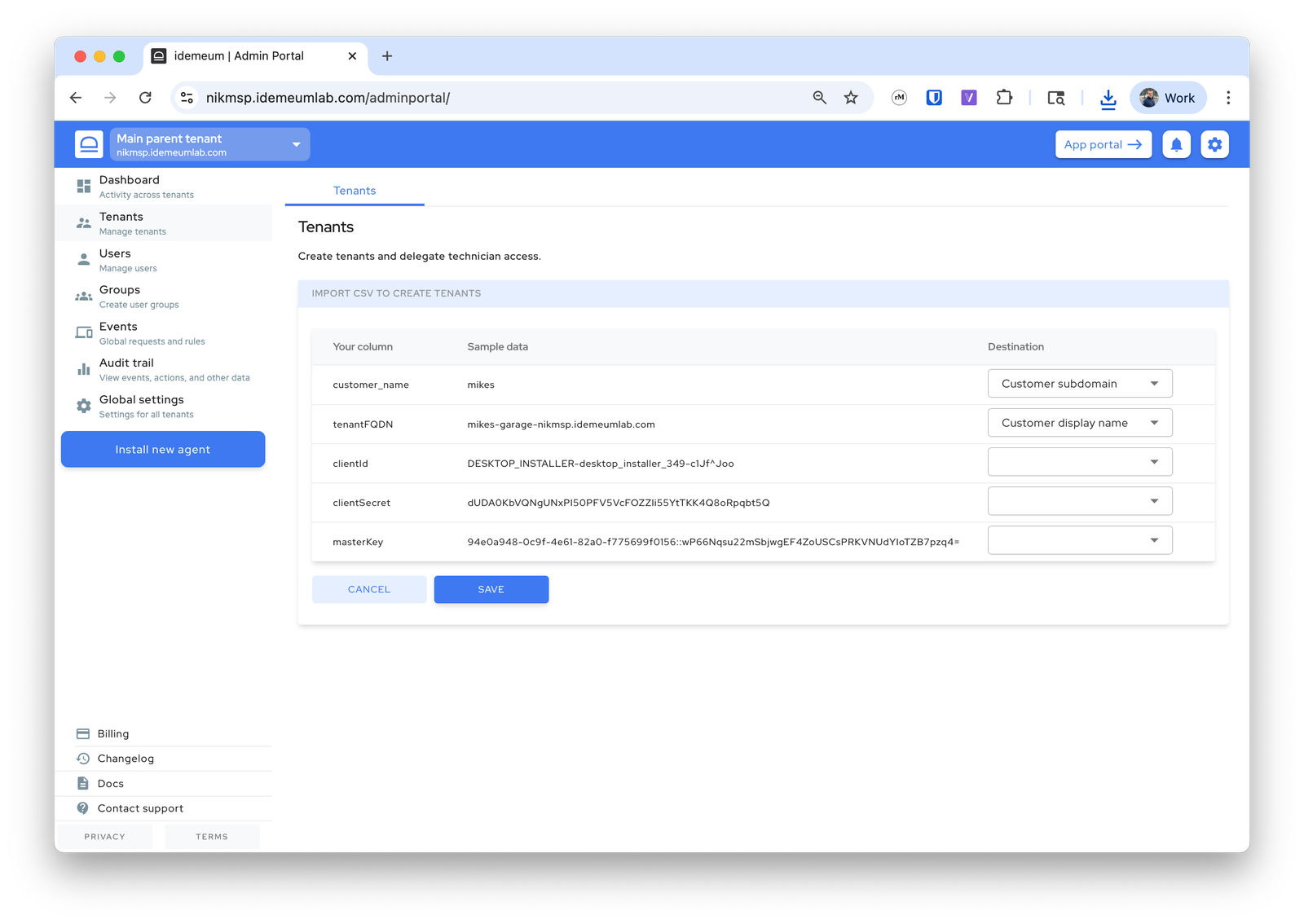
- Once you click next, idemeum will process the creation request, and it will create the tenants. Once completed, you will be presented with information for how many tenants were created and what errors were present if any.