How EPM events work

EPM events are collected only when EPM is enabled, and the EPM control mode for the workstation is set to audit or rules.
  • Events are captured on Windows and macOS workstations when applications need to launch with administrative privileges.
  • On windows idemeum agent intercepts and captures the UAC event. For macOS we rely on endpoint security API to capture the elevation event.
  • Elevation events are captured for both admin and standard users
  • Idemeum cloud retains 120 days of elevation events per tenant
  • There are no duplicates in elevation events. If the elevation event gets generated for the same application, user, and workstation, the time stamp gets updated and elevation events gets to the top of the list.
  • Elevations events are uploaded to cloud in real time

EPM event structure

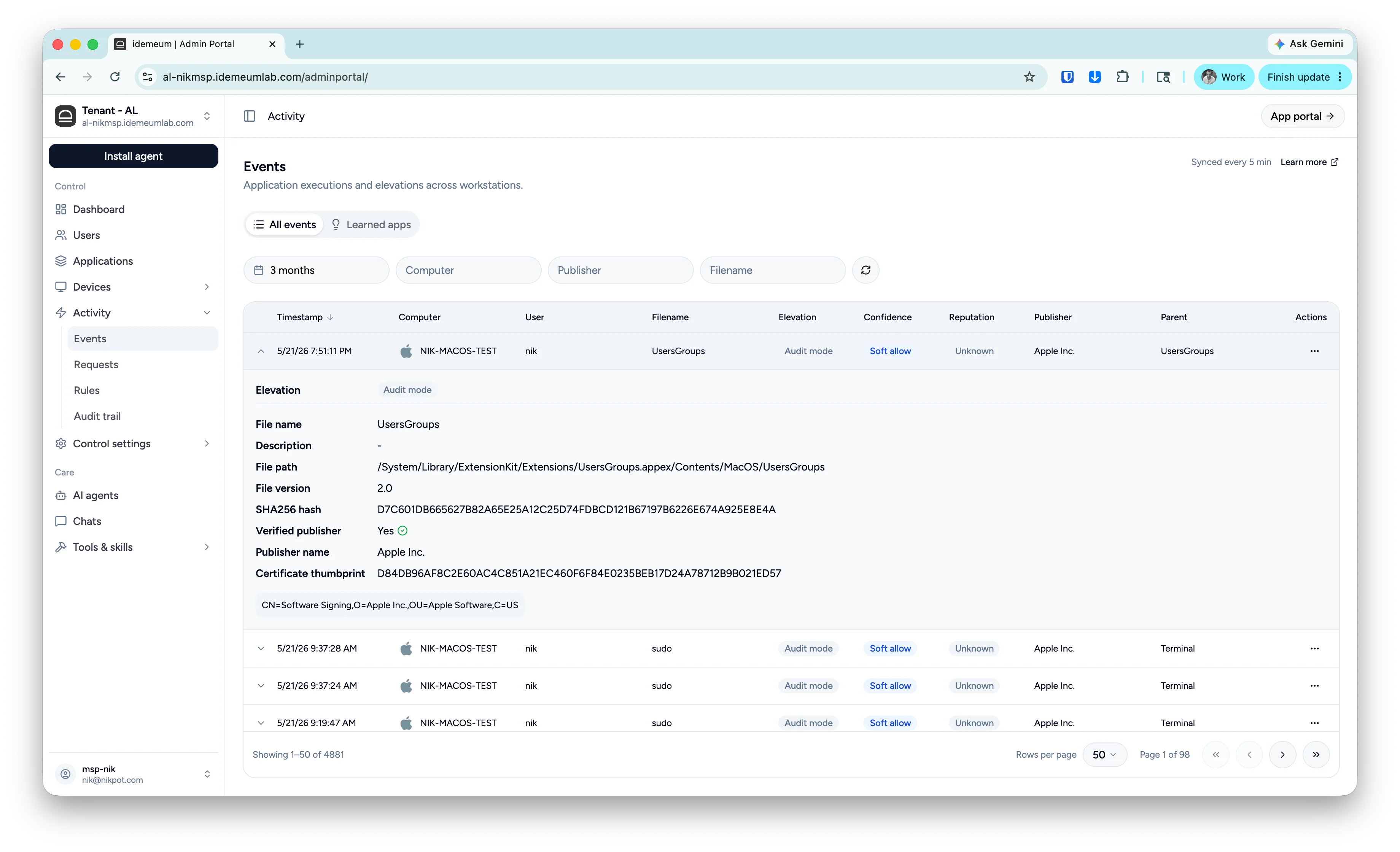
If you click on the event, you will be presented with the detailed information, including hashes, verified publisher, path, and more. At the bottom of the event section you will find the publisher certificate elements (i.e details of the organization that signed the executable). The green check mark indicates that the publisher is verified by operating system.
Epm Event
ValueExampleDescription
Timestamp1/30/26 3:33:52 PMDate and time for when the execution or elevation happened.
ComputerAL-W11-LWorkstation that generated the event. Next to the computer name you will see the icon for Windows or macOS.
UserSYSTEMUser under which context the application is executing.
Filenameupdater.exeFilename of the executed application.
ElevationAllowTag that shows whether the application was allowed to elevate or not. For standard non-admin executions this tag is not shown.
PublisherGoogle LLCOrganization that signed the executable. If you expand the event, you will be able to see whether the publisher is verified by operating system or not.
Parentconsent.exeParent process that was responsible for launching the executable.
Actions...Actions that you can take on the event, including rule creation.
DescriptionGoogle updaterDescription of the executable file.
File pathC:/program...File path from where the executable is launching.
File version2.5.1File version of the executable.
SHA256 hash320F6790E928200...Hash of the executable file takes with SHA256 algorithm.
Verified publisherYesIf the executable is legitimately signed with the certificate, and that certificate is trusted on the endpoint, the publisher will show as verified.
Certificate thumbprint607A3EDAA64933...Hash of the certificate that is used to sign the executable (if executable is signed).
Certificate elementsCN=Google LLC,OU=Google...When you expand the event, idemeum shows you the elements of the certificate that is used to sign the executable, such as CN, OU, C, etc.